Authenticate users with OAuth
The full OAuth setup from scratch: Simple OAuth keys, scopes and a consumer in Drupal, druxt-auth in Nuxt, and the traps on both sides.
Before you start: the login flow tutorial uses the quickstart's ready-made OAuth setup. This guide builds that setup from scratch on your own backend. Drupal-side commands run in the Drupal project root, with drush installed (
composer require drush/drush); if the backend runs in a container, prefix them with your tool's exec command.
Druxt authenticates with OAuth 2 Authorization Code + PKCE:
Simple OAuth on the Drupal
side, druxt-auth (built on
@nuxtjs/auth-next) on the Nuxt side. The whole flow:
%% The Authorization Code + PKCE login flow between browser, frontend and Drupal
sequenceDiagram
  participant B as Browser
  participant F as Frontend (druxt-auth)
  participant D as Drupal (Simple OAuth)
  B->>F: Log in
  F->>D: /oauth/authorize + code challenge
  D->>B: Drupal login form
  B->>D: credentials
  D-->>F: redirect to /callback with code
  F->>D: /oauth/token + code verifier
  D-->>F: access + refresh tokens
  Note over F: Authorization header set on the shared axios instance
Drupal: install and generate keys
Simple OAuth 6 requires Drupal core 10.3 or later.
composer require drupal/simple_oauth:^6
drush pm:enable simple_oauth -y
mkdir ../keys
drush simple-oauth:generate-keys ../keys
The key pair belongs outside the web root; ../keys here sits next
to Drupal's web/ directory, not inside it. The directory must exist
before the command runs, and the keys never go in git. If a key file
must live under a served path for platform reasons, commit only a
web-server deny rule for the directory (an .htaccess stub on Apache;
an equivalent server rule on nginx). If key generation fails on Windows,
generate under WSL2; native OpenSSL setups there have repeatedly
produced broken keys that surface later as opaque frontend errors.
Set the token lifetimes on the settings form at
/admin/config/people/simple_oauth: short access tokens with longer
refresh tokens (minutes and hours respectively) limit the damage of a
leaked token while keeping sessions usable.
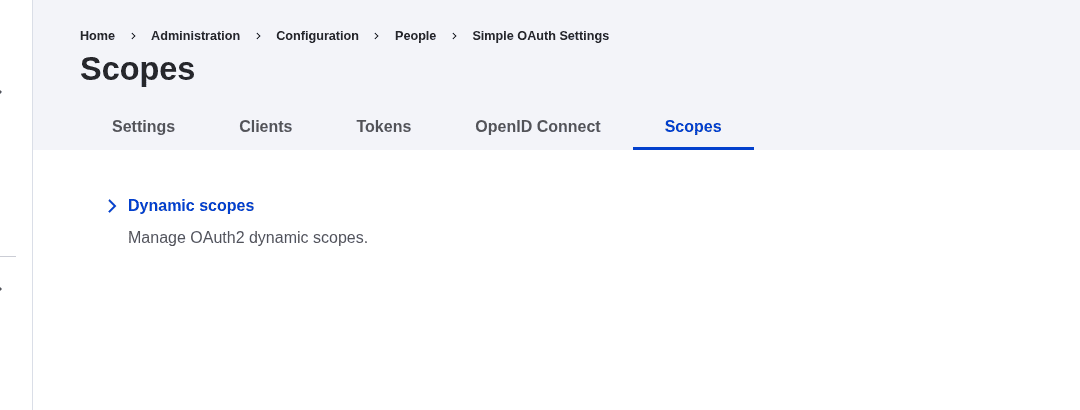
Drupal: create a scope
Simple OAuth 6 refuses any authorization request it cannot resolve a
scope for, and a fresh site has an empty scope list, so every login fails
with "Check the scope parameter" until one exists. Create one at
/admin/config/people/simple_oauth/oauth2_scope: grant types
authorization_code and refresh_token, with the granularity field
set to role and mapped to the role your users hold. Drupal has two
built-in roles, Anonymous and Authenticated, and permissions attach to
roles, so authenticated is the usual mapping here.
Drupal: create the consumer
A Consumer is Drupal's entity for one registered OAuth client, provided
by the consumers module that arrives as a Simple OAuth dependency.
Create one at /admin/config/services/consumer (an administrator
account is needed for all of these forms):
| Field | Value |
|---|---|
| Client ID | A stable id your frontend will use; generate a UUID |
| Secret | Empty. A browser app cannot keep a secret; PKCE replaces it |
| Confidential | Off |
| PKCE | On |
| Scopes | The scope you created, set as the consumer's default |
| Redirect URI | https://your-frontend/callback, one per environment |
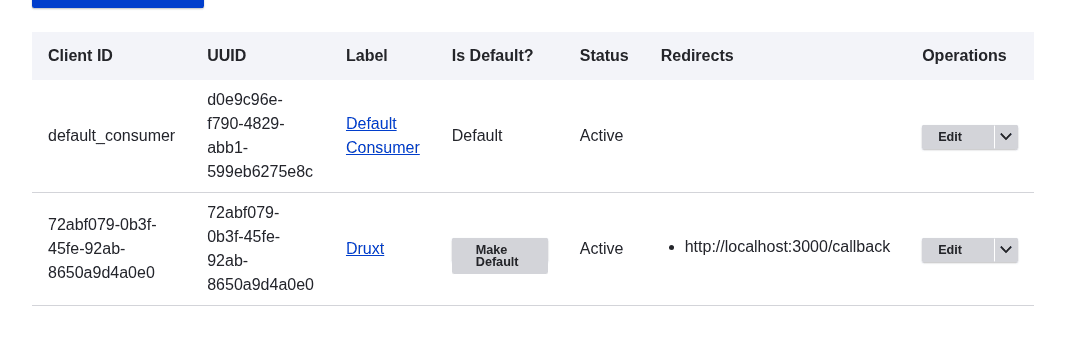
Every frontend origin that logs in needs its redirect URI registered;
the origins people forget are previews and http://localhost:3000.
Production setups keep one consumer per environment.
Nuxt: configure druxt-auth
Options are flat, and the module goes in modules, not buildModules:
it registers server middleware that nuxt start only loads from
modules.
export default {
  modules: [
    ['druxt-auth', { clientId: process.env.OAUTH_CLIENT_ID }],
  ],
}
No scope option is needed. When the app sends none, Drupal applies
the consumer's default scopes, and the consumer table above made your
scope that default. Pass scope: ['<machine-name>'] only when one
consumer serves several scopes and this app must pick; the value must
equal the scope's machine name in Drupal, or logins fail with the same
"Check the scope parameter" error.
The module registers two strategies: drupal-authorization_code (the
PKCE flow above, the right default) and drupal-password (server-side
password grant). Trigger a login from any component:
this.$auth.loginWith('drupal-authorization_code')
The /callback route is handled for you.
The login page trap
A "Log in" menu link pointing at /user/login fails: Decoupled Router
(the Drupal module that resolves paths for the
frontend) has no resolver for Drupal's user routes, so the request for
that path errors. Either create your own page at pages/user/login.vue
that calls loginWith, or point the menu link somewhere the frontend
owns. There is no default login page to fall back on.
Which requests send the token
On login, @nuxtjs/auth-next sets the Authorization header on the
app's shared axios instance, and Druxt's client uses that same instance
by default, so JSON:API requests for entities, menus and routes carry
the token automatically. Drupal then applies the user's real permissions
to every response. The caveats:
- The header is global to that instance. Requests your app makes to
third-party APIs through the same
$axiosinclude the user's token too. Give those a separate axios instance. - Configuring
druxt.axiosinnuxt.config.jsmakes the DruxtClient create its own instance, and the automatic header no longer reaches it. Either keep the default wiring, or attach the token explicitly with$druxt.addHeaders({ Authorization: this.$auth.strategy.token.get() }).
The userinfo endpoint is proxied through the frontend only when the
API proxy is enabled; without it the browser calls
Drupal's /oauth/userinfo cross-origin, which needs
CORS.
Writes, and the CSRF question
Form submissions through DruxtEntityForm are JSON:API writes.
Enable writes
(read_only: 0) first. With Bearer token authentication, no CSRF
token is needed; Drupal's CSRF protection applies to cookie
sessions. A 403 naming X-CSRF-Token means the request authenticated
by cookie (typically a session shared with the Drupal domain) rather
than by the OAuth header: attach the Bearer token as above, or fetch a
CSRF token from Drupal's /session/token and send it in the
X-CSRF-Token header alongside cookie auth.
Logging out
this.$auth.logout() ends the frontend session. Data fetched while
logged in stays in the DruxtStore until the
page reloads; a logout flow that must drop privileged content
immediately should force a reload or flush the affected resources.
Where to go next
- Add a login flow: the tutorial version on the quickstart.
- Request topology: how hosting layout affects cookies and credentialed CORS.
- druxt-auth README: every module option, including the password-grant strategy's server-side secret.